Contract Testing
A contract records what a consumer actually relies on from a provider API: the requests it really sent and the responses it really received, fully materialized. The provider replays those interactions against its own implementation, so a breaking change is caught in the provider's pipeline instead of surfacing as a red build in every consumer's.
It complements your test cases rather than replacing them:
| A test case | A contract | |
|---|---|---|
| Checked against | the imported API specification | what a specific consumer observed |
| Runs in | the consumer's pipeline | the provider's pipeline |
| Fails when | the API stopped matching the spec or your expectations | the provider stopped satisfying a real consumer |
A Contract Is a File, Not a Service
A contract is a plain JSON document that lives next to the project that produced it:
Booking/
├── Booking.aprj
├── contracts/
│   └── Booking-Flow.contract      ← committed to the repository
└── ...
So contract testing needs no server, no login and no network:
- the expectations are the file;
- the structure comes from the provider's own installed extension — the object model generated from its specification, which is what the typed check compares against;
- exchange is git: the consumer commits the file, the provider (or a shared repository) carries it.
Publishing contracts to the Extension Repository was considered and rejected: it would have made verification depend on a running service and moved recorded request/response bodies off the developer's machine, for a problem a committed file already solves (decision 0039).
Exporting From Studio
Right-click a test case in the Test Automation tree and choose Export contract…. The dialog
lists what that case recorded during its last run, asks who the consumer is and how strict the
provider's check should be, and writes the file into the project's own contracts folder.
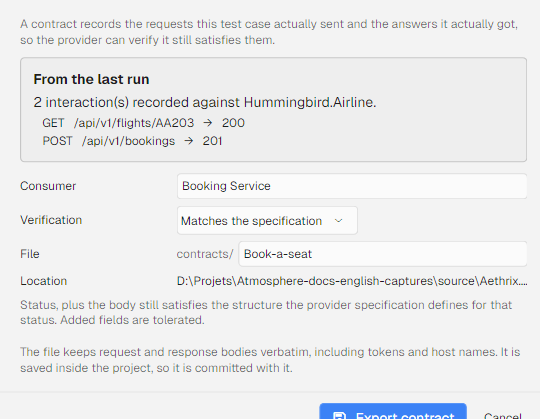
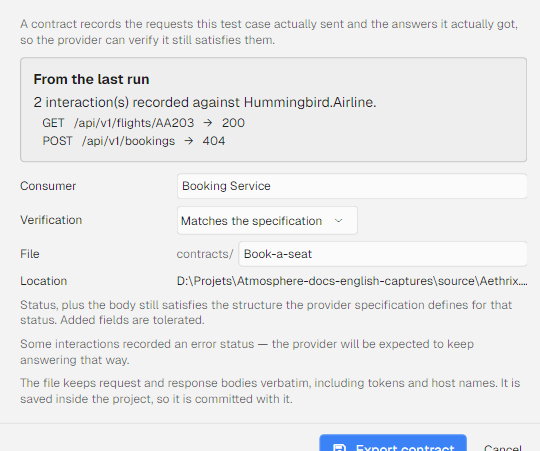
A case that has not been executed yet has nothing to record, so the dialog says so instead of offering an empty contract. Anything worth confirming before you commit the file is raised as a warning in the same dialog — an interaction without an operation id, a missing provider service id, or a recorded error status that the provider will now be held to.
Verifying From Studio
Once the project's contracts folder holds at least one file, a Contracts node appears under the
project in the Test Automation tree, listing one row per contract file. Right-click the node for
Verify contracts…, Refresh (re-read the folder) and Open folder; right-click a single
contract for Verify this contract. The project node's own context menu carries the same
Verify contracts… entry.
The verification dialog lists the contracts the project carries — consumer, interaction count, strictness — lets you pick the environment and optionally override the strictness or the target URL, and replays every interaction against the installed extensions.
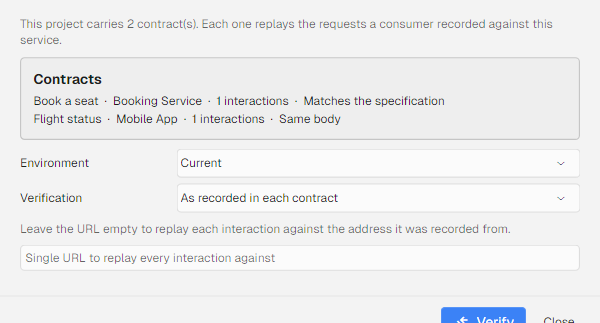
A failing interaction is reported with the assertion that stopped matching, so the answer to "what did we break?" is in the dialog rather than in a diff you have to reconstruct. A contract naming an operation the provider no longer defines is marked invalidated and is not replayed.
:::note The node is cheap by design The Contracts node appears only while the folder holds files, a row shows a file name and nothing else — reading a contract to draw a row would cost every project that has one — and the folder is re-listed when you touch the node or export a contract, not watched on disk. :::
Quickest Scenario
# 1. Consumer: run the tests and record what they exercised (into Booking/contracts/)
aeth run ./Booking.aprj --env staging --export-contracts

# 2. Commit the file to wherever the provider can see it (its repo, or a shared one), e.g.
#    into Airline/contracts/Booking-Flow.contract

# 3. Provider: verify your implementation against every contract you carry
aeth verify-contract --project ./Airline.aprj --env staging
verify-contract exits 0 only when every contract verifies, and 1 when an interaction fails
or a contract references an operation the provider no longer defines.
Export runs together with the test run on purpose: responses are runtime state and are not stored inside the project file, so a contract can only be recorded while the requests are actually made.
How Strict Should the Check Be
The strictness is stored in the contract and can be overridden per run with --strict:
| Level | CLI value | What must match |
|---|---|---|
| Status only | status | The HTTP status code of each interaction |
| Typed conformance (default) | type | Status, plus the response body satisfies the structure defined for that status code in the imported specification |
| Exact members | exact | The above, plus the response body equals the recorded body (JSON compared member by member) |
type is the recommended level: it fails when a field a consumer depends on disappears or changes
type, while tolerating fields you have added. Use exact where the response shape must not drift.
When a Change Invalidates a Contract
Before anything is sent, each recorded operation is resolved against the provider project's installed extensions. A removed or renamed operation invalidates its contract and is reported instead of being quietly skipped:
Verifying 'Booking Flow' (3 interaction(s), strictness TypeConformant) from Airline/contracts/Booking-Flow.contract.
  invalidated by the provider's current extension:
    operation not found: Hummingbird.Airline.GET /api/v1/pet/{id} — regenerate the contract from the consumer's current test case.
Nothing is replayed in that case: a contract naming operations that no longer exist cannot be verified honestly, so the consumer regenerates it.
A changed specification is not the same as a failed contract
Each contract also records the hash of the specification the provider's extension was generated from. When the provider now installs an extension built from a different specification, the contract is annotated:
specification changed since this contract was recorded (a1b2c3d4e5f6 → d4e5f6a1b2c3) —
a failure may be an intended change; review it, then regenerate the contract
That annotation never fails a run by itself. It changes what a failure means: with no drift, a failing interaction is a regression against what the consumer depends on; with drift, it is plausibly a change the provider meant to make, and the decision is to regenerate the contract (accepting the change) or to revert it. Contracts recorded before this field existed, and extensions published as legacy binary packages without specification provenance, report no drift either way — the absence of a hash is not treated as a match.
Checking Conformance From Inside a Test Case
The same rule is available as a step assertion. Add the Schema Conformance Assertion to a
Send Request step to fail that step when the response no longer matches what the specification
defines for the returned status code — field-level violations show up in the step diagnostics, for
example Pet.Name: required field is null. A status code the specification does not describe is
reported but not treated as a failure. See
Assertions.
Contract File Reference
| Field | Meaning |
|---|---|
name | Display name — the test case that recorded it |
consumer | Consumer identity recorded in the document |
providerServiceId | Provider service the interactions belong to |
specHash | Hash of the consumer's installed provider extension at record time (drift signal) |
strictness | StatusOnly, TypeConformant or ExactMembers |
interactions[] | name, operationId, method, uri, contentType, headers[], requestBody, expectedStatusCode, expectedBody |
recordedAtUtc | When the interactions were captured |
Test cases that made no requests produce no file. File names come from the test case name, with spaces replaced by hyphens.
Command Reference
aeth run <project> --export-contracts [<dir>]
Writes one .contract file per test case that recorded at least one interaction. With no directory,
the project's own contracts folder is used — which is the default you want, because it puts the
contract under version control next to the tests that produced it.
aeth verify-contract [<contract-file>] [options]
| Option | Description |
|---|---|
--project <aprj>, -p | Required. Provider automation project whose installed extensions define the service |
<contract-file> | Verify this one file instead of the project's contracts folder |
--contract <name> | Within the folder, verify only this contract (file name or contract name) |
--key <key>, -k | Encryption key of a password-protected provider project |
--env <name>, -e | Test environment of the provider project to run against |
--url <url> | Replace the URL recorded in every interaction, to point at another host or port |
--strict status|type|exact | Override the strictness stored in the contracts |
What a Contract Carries, and Where It Goes
A contract holds recorded request and response bodies, which in practice means tokens, payload samples and internal host names. Keep that in mind when you choose the repository it is committed to — the same place you would commit a fixture, not a public one — and regenerate rather than hand edit when the provider changes.
See Also
- CLI Reference — every
aethcommand - CI/CD Integration — running verification in a pipeline
- Assertions — the specification-based assertions
- Environments & Variables — the environments these commands run against
- Adding Services to an Extension — where the provider structure comes from