API Playground Overview
The API Playground is Aethrix Studio's manual API testing area: send requests to REST, SOAP, OData, GraphQL, Kafka, gRPC and WebSocket services interactively — including gRPC streaming calls and a WebSocket listener. It is designed for API exploration, debugging, and ad-hoc verification.
When to use
Use the API Playground when you want to poke at a single endpoint without writing an automated test: try different bodies or headers, inspect raw responses, compare behavior across environments, or prototype a call before turning it into a repeatable test step. For repeatable, scheduled, or CI runs, build an automation test case instead.
Layout
The API Playground view has three zones:
| Zone | Position | Purpose |
|---|---|---|
| API selection pane | Left panel | Hierarchical list of imported APIs — Applications → Services → Operations |
| Detail Panel | Main area | Context-sensitive: onboarding guide, application/service details, or request editor |
| Toolbar | Top bar | Active Environment selector, Import API definition, Add Extension buttons |
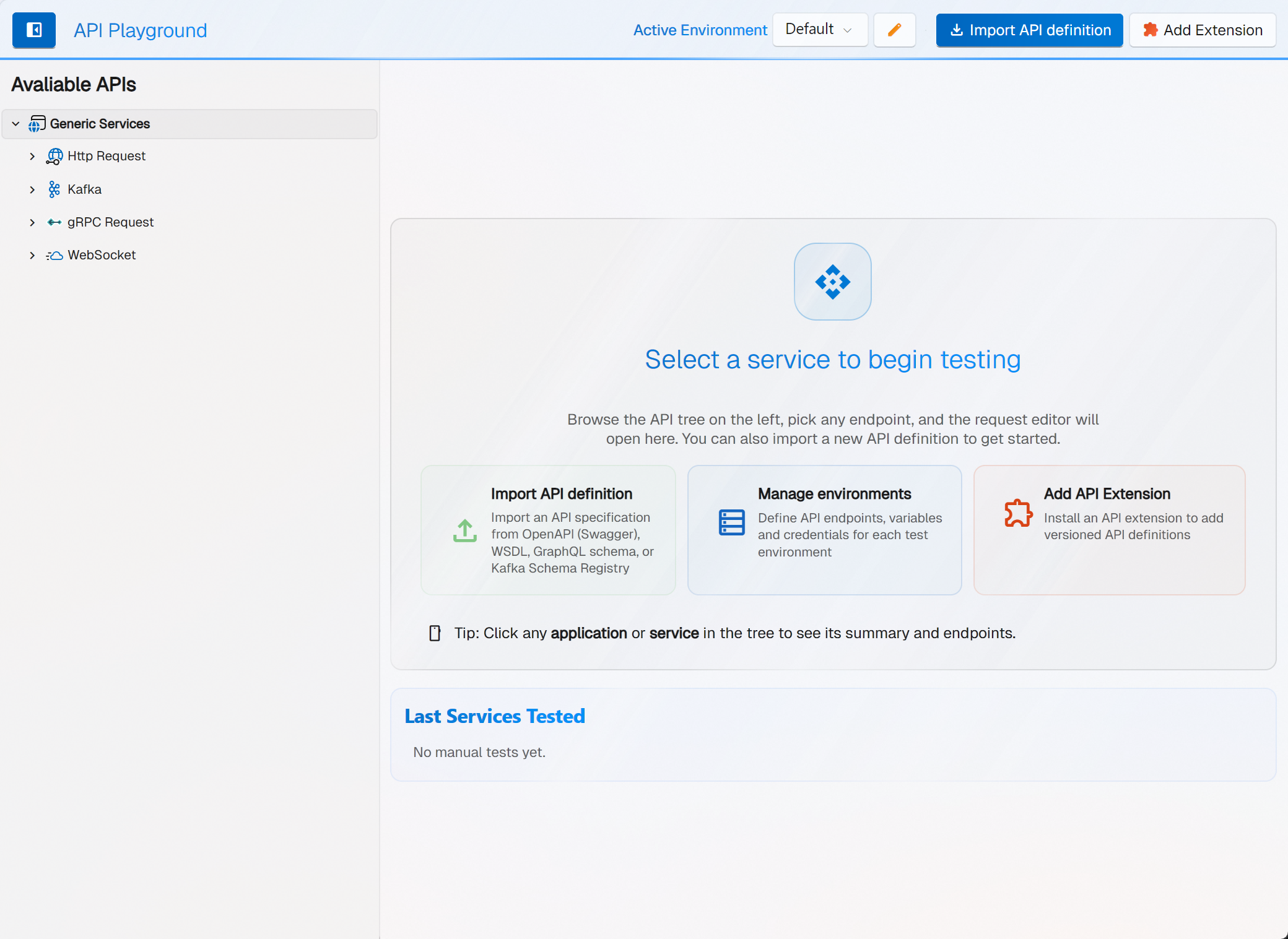
Toolbar
The top toolbar contains:
- Show/Hide API selection pane — toggle button (panel icon) that collapses or expands the left tree pane.
- Active Environment — a label and a combo box listing the available test environments. Selecting one updates the base URLs used by the request editor.
- Manage environments — the edit (pencil) button next to the environment selector opens the environment manager.
- Import API definition (accent button) — opens the import wizard to add a new API specification.
- Add Extension — opens the wizard to install an API extension (versioned API definitions).
The History button that was previously shown in this toolbar has been removed; open Message History from the main navigation instead (see Message History).
Typical Workflow
Getting Started (Onboarding)
When no API has been imported yet, the detail area shows the onboarding panel with three action tiles:
| Tile | Purpose |
|---|---|
| Import API definition | Import an API definition from OpenAPI (Swagger), WSDL, GraphQL (SDL or introspection), OData $metadata, gRPC .proto, AsyncAPI (WebSocket) or Kafka Schema Registry |
| Manage environments | Define API endpoints, variables and credentials for each test environment |
| Add API Extension | Install an API extension to add versioned API definitions |
A tip line reminds you that you can click any application or service in the tree to see its summary and endpoints. Below the tiles, a Recently Tested Services list gives quick access to endpoints you have used before.
The Service Tree
The API selection pane (header: Avaliable APIs) organizes imported APIs into a three-level hierarchy:
- Application — the API product name (e.g., "Petstore API")
- Service — a logical grouping of endpoints (e.g., "Pets", "Users")
- Operation — an individual endpoint (e.g.,
GET /pets/{id})
Selecting an application or service node shows summary details. Selecting an operation loads its request configuration into the editor.
See Service Tree & Organization for details.
Request Editor
When an operation is selected, the request editor opens. The toolbar above the editor provides:
- Send — send the request.
- Copy — opens a menu to generate cURL, JavaScript Fetch, or HTTPie code, or to copy the request as automation test step.
- Import cURL — import a cURL command or paste a raw HTTP request.
There is no Save button: moving to another node or sending is what saves the request you are on. Save as keeps a second version of it under a name you choose, as a child of the operation. Along the bottom of the editor, a collapsible strip holds the filling rules, checks, extractions and diagnostics for that request — see Request Editor.
The editor itself uses these tabs and controls:
| Tab / Control | Purpose |
|---|---|
| Request | URL / endpoint, request body (visual tree editor or raw text), View Mode selector |
| RAW button | Opens the complete raw HTTP request message (visible only when a raw request is available) |
| Authentication | Auth mode selector — Anonymous (None), Basic, Digest, Windows, Bearer Token, OAuth 2.0 / OpenID Connect, API Key. Client certificates are set under Options (mTLS), and Kafka authenticates through its own security protocol and SASL mechanism. See Authentication; note that Digest and Windows are sent as Basic today |
| Headers | HTTP headers grid with add/remove; an attention badge shows the header count |
| Options | Protocol-specific settings (content type, SOAP version, Kafka transformers) |
| Response panel | Separate panel (toggled with the response button) showing the status, response body with syntax highlighting, and a context menu with XPath/JsonPath actions and assertion helpers |
See Request Editor Deep-Dive for details.
Response Viewer
After sending a request, the Response panel displays:
- HTTP status code (tag) and elapsed time, with a timing-breakdown flyout (Prep / TTFB / Receive / Total)
- Response headers (collapsible)
- Response body with syntax highlighting
- Tree view for JSON/XML responses with XPath/JsonPath context-menu actions
See Response Viewer for details.
Environment Support
The Active Environment selector in the toolbar lets you switch between environment configurations. Environments define service endpoint URLs, variables, and credentials. Switching environments updates all service base URLs automatically.
See Environment Management for details.
Supported Protocols
| Protocol | Import From | Body Editor | Auth Support |
|---|---|---|---|
| REST | OpenAPI 2.0/3.x (JSON/YAML) | Object Editor, Raw HTTP | None, Basic, Bearer, API key, OAuth 2.0 / OIDC, client certificate (mTLS) |
| SOAP | WSDL 1.1/1.2 | Object Editor, Raw XML | as REST; plus MTOM and SOAP version options |
| OData | $metadata (CSDL) | Object Editor over typed entities | as REST |
| GraphQL | Introspection, SDL | Object Editor over the generated operation type — query and operationName are read-only, variables is the typed part | as REST |
| Kafka | Schema Registry (avsc/proto) | Schema-bound message editor, live consumer stream | Kafka SASL (PLAIN, SCRAM-SHA-256/512, GSSAPI, OAUTHBEARER) |
| gRPC | Protobuf (.proto) | Object Editor, plus the streaming editor for client / server / bidirectional calls | as REST; metadata and deadline in Options |
| WebSocket | AsyncAPI | Message editor + listener view for the inbound stream | connection-level auth as configured for the endpoint |
Digest and Windows (NTLM) appear as selectors but are not implemented — see Authentication. No protocol here is sent through a cloud relay: the playground calls the endpoint you typed, from your machine.
Message History
Every request sent and response received is recorded in the Message History. You can browse, search, and inspect past requests from the main navigation.
See Message History for details.